A working list for the table, not the internet. Every tool here was picked for one job: run a physical session without a laptop full of tabs.
Running a game in person is a different problem than running one online. You don't need voice chat or a virtual tabletop with a thousand settings. You need initiative that doesn't fall apart when someone stands up to get a drink, a name generator you can hit in two seconds when a player talks to a shopkeeper you didn't plan for, and rules you can find before the table gets bored watching you flip pages.
This list only includes tools that work at a real table: fast to open, fast to use one-handed while you're also refereeing a fight, and free enough that a new DM can use every one of them without pulling out a credit card. Where a tool has a paid tier, that's said plainly, because "free forever" and "free trial" are not the same promise.
The single biggest slowdown at a real table is combat bookkeeping: whose turn is it, who has what condition, how much HP is left on the goblin nobody wrote down. A good tracker gets out of the way and just answers those questions.
Look for a tracker that handles three things without extra taps: initiative order, HP per combatant, and status conditions that don't get forgotten two rounds later. A difficulty estimate before you start the fight (so you're not guessing whether four goblins will kill a level-2 party) is a genuine time-saver, not a gimmick.
Kobold+ Fight Club is the one most tables reach for, and it is free in a browser with no account. It does the part people get wrong: you search monsters, drop them into an encounter, and it rates how dangerous that fight actually is for your party before you run it. You can import your own monsters into it. What it deliberately does not do is run the fight, so most DMs pair it with something that tracks initiative and hit points.
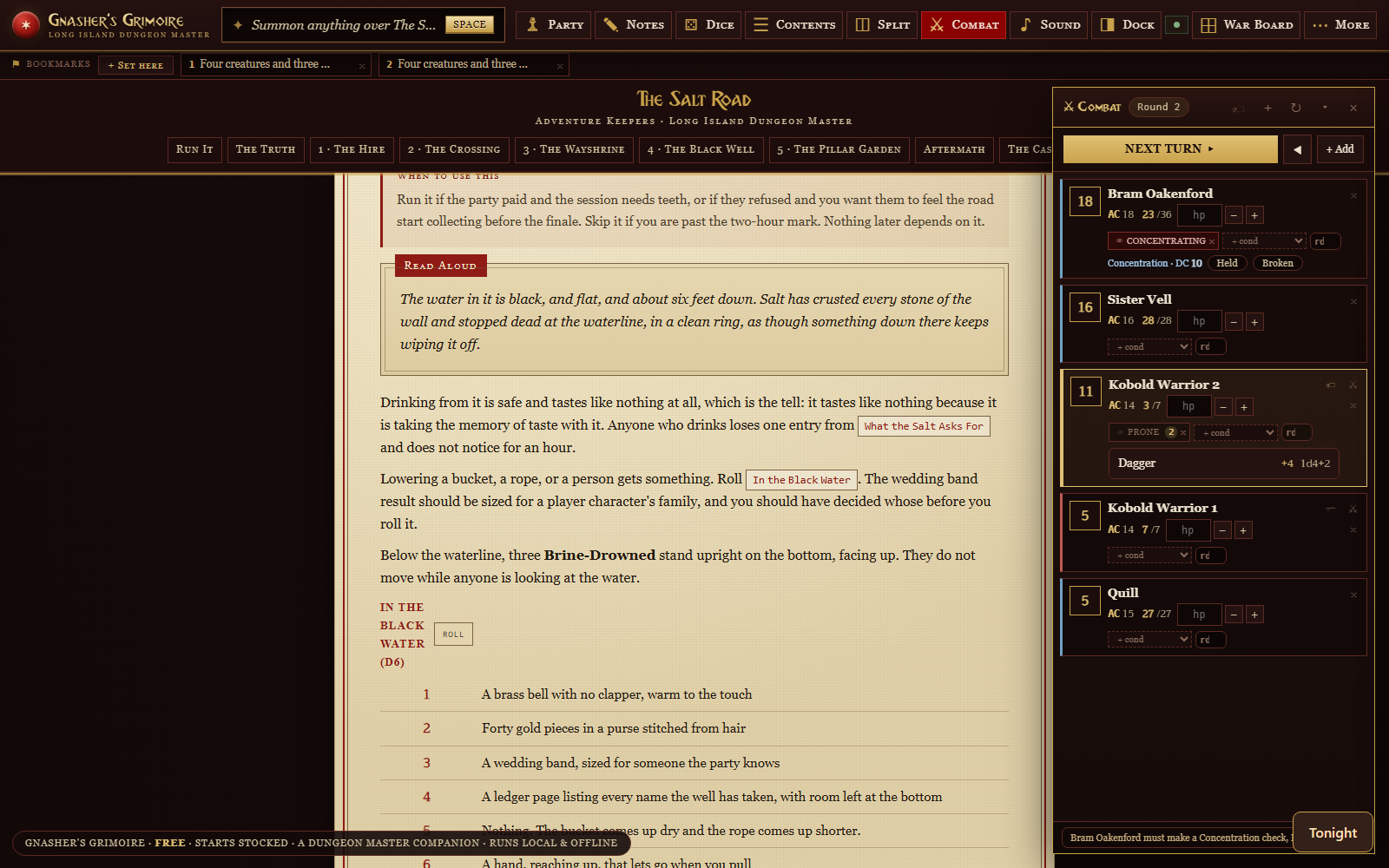
Gnasher's Grimoire's War Table is built for exactly this. You muster your party and any monsters into an encounter, get a plain difficulty read (Trivial through Deadly) before you commit, then run it: initiative order, HP and conditions per combatant, and a round counter. Timed conditions count down and drop off on their own instead of you tracking them on a sticky note. If you want a shared map, the same combat tracker doubles as the token layer on the built-in battle map, so a monster's HP and its position on the map are the same piece of data instead of two things you update separately.
Every DM eventually gets asked a question they didn't prep for: what's the barkeep's name, what's in this chest, who is this stranger at the crossroads. A name generator and a loot table are the fastest way to answer without breaking the scene to think out loud.
The SRD rules content built into Gnasher's Grimoire includes encounter and treasure tables you can roll straight from the search bar, and any table you build yourself (even a quick one pasted from a spreadsheet) becomes rollable too, reading the die size off your own column. That covers homebrew loot tables and published SRD tables from the same search box, without switching apps mid-scene.
donjon is the deepest free set of these there is and has been quietly free for years: names, weather, treasure, taverns, dungeons, calendars, whole campaigns, even a medieval demographics calculator if you want to know how many blacksmiths a town of 3,000 supports. It is plain and fast and asks for nothing. Watabou’s generators are the other half: one-page dungeons, towns and coastlines that come out looking hand-drawn, free in the browser, and good enough to put straight in front of players.
Not every table wants a screen for maps, and that's a legitimate choice. But for tables that do, a digital battle map earns its place by replacing dry-erase mats and loose miniatures with something that remembers positions, fog, and terrain between sessions.
| What to check for | Why it matters at a physical table |
|---|---|
| Use your own map images | You're not locked into a library that doesn't have the dungeon you drew or bought. |
| Grid alignment, not just grid-required maps | Hand-drawn and purchased maps rarely arrive pre-gridded. |
| Fog of war you control | Players see only what their characters have seen, without a second screen. |
| Tokens tied to your combat tracker | Moving a token shouldn't be disconnected from that combatant's HP and conditions. |
Dungeon Scrawl is the fastest way to get a battle map out of nothing. Free, no sign-up, unlimited maps, and it exports for print or for a virtual tabletop. Roll20 owns it now; a Pro tier adds autosave, sharing and commercial rights, but the map-making itself is not held back. Owlbear Rodeo is the better answer if you want a map your players follow on their own phones. Its free tier gives you two rooms and 200MB, and unusually it does not hold features back. You get all the tools and dynamic lighting on the free plan, and the paid tiers ($3.99 and $7.99 a month, checked September 2026) buy storage and more rooms. Both need the internet. If your table is remote or hybrid, Owlbear Rodeo is simply the right tool and I would use it over mine.
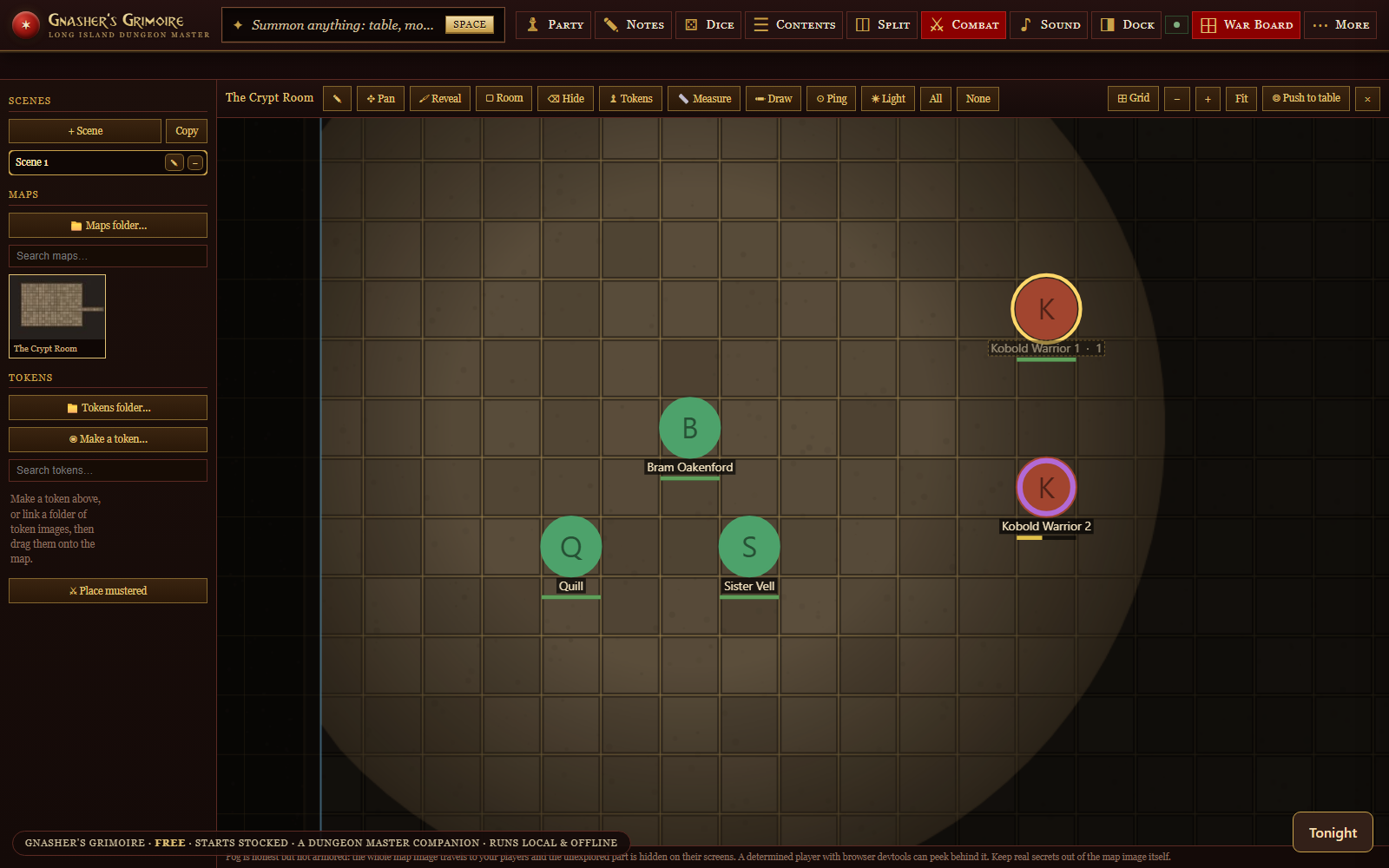
Gnasher's Grimoire's War Board lets you point at your own folder of map images, align the grid (or skip grid entirely), and paint fog back with a brush, rectangle, or eraser. Tokens use your own art, and a combatant mustered on the War Table is its token on the map, so HP and position stay in sync automatically. If players are running Gnasher's Satchel on their own phones, the board and its fog push to their screens live, and their rolls come back to your log, all without a server or an account on either end.
The rulebook flip is the second-biggest table-slowdown after combat math. A searchable rules reference beats physical books for one reason: you can search it, and a physical book only opens to where your thumb lands.
What actually helps mid-session is a reference that returns a monster stat block, a spell description, or a rule in one search, and lets you pull it up as a small card without losing your place in the adventure text you're reading aloud from.
Open5e is the reference worth bookmarking: an open-source, ad-free copy of the free 5th-edition rules, covering monsters, spells, magic items and conditions, with a public API if you ever want to build something on top of it. It is a website, so it wants a connection, which is the one thing that matters if your table is in a basement.
Gnasher's Grimoire ships with the full free 5th-edition SRD already installed and searchable (monsters, spells, items, and rules), so there's nothing to download or import before your first session. Press a key, type a few letters of what you're looking for, and it floats over whatever page you're already on.
The best note system is the one you'll actually use after a long night at the table, which usually means it has to be fast, not fancy. Bullet points beat prose. A running list of NPCs and open threads beats a wiki you have to maintain.
Obsidian is the one to beat here and it is free for personal use. Your notes are plain Markdown files in a folder on your own disk, which means nothing you write is trapped in someone else’s product later. It is not built for D&D specifically, and that is the trade: you get a better writing tool and you assemble the game-shaped parts yourself.
Gnasher's Grimoire can export a self-contained recap page of a session (the rolls, the fight, your bookmarks, the party) with one click, and separately can link an Obsidian vault folder so your own notes, statblocks, and NPCs appear inside the app alongside anything you bought. Neither of those requires an account or uploads anything off your machine.
"Free" gets used loosely in this space. Before you build a session around a tool, check what it actually costs you:
The tools in this list have a genuinely free tier you can run a full session on: a combat tracker, generators, and rules lookup with no payment required. Some, including our own Grimoire, are free with optional paid content (adventures, monster packs) layered on top rather than a subscription gate on the core app. Read the fine print before you build a campaign around a "free" tool with a page or feature cap.
Check this specifically, because a lot of "free DM tools" are web apps that need a live connection to load. Gnasher's Grimoire is one HTML file that opens in any browser and runs the same with the internet off, since nothing it does depends on a server. If a tool advertises itself as an app instead of a website, ask whether "offline mode" means fully offline or just a cached view of an online tool.
Not for anything on this list at the core-feature level. Gnasher's Grimoire specifically needs no account, no login, and no server; your data lives in the browser you're running it in (or on a USB stick if you link one), not on a company's servers.
Start with whichever tool bundles the most of what you need in one place, so you're not juggling four browser tabs at the table. A combat tracker plus a searchable rules reference plus generators, in one app, is the highest-leverage combination for a first-time DM. Gnasher's Grimoire bundles those three plus a battle map and covers most of a beginner's first few sessions without any other tool open.
Only if a specific limitation is actually slowing your table down. A paid virtual tabletop with heavy online-multiplayer features makes sense if you're running a hybrid table with remote players every week. For a purely in-person table, most paid upgrades in this space buy you content (published adventures, art packs) rather than functionality you couldn't already do for free.